Tech blog
Deploying Nexterm

One of the small things that has made my homelab feel a lot more usable lately has been deploying Nexterm.
It is not the biggest or most complicated thing I run. It is not one of those services that makes for a flashy screenshot either. But in day to day use, it has ended up being one of the handiest tools I have added.
My homelab has gradually turned into the usual mix of VMs, containers, Linux boxes, web services, and things I probably only intended to "test for a bit" and then never turned off. Once you get to that point, there is always something that needs checking. A service needs a restart. A config file needs a quick edit. A log needs reading. A box is up, but acting weird. A container is fine, but only if you go in and actually look.
Normally that means opening a terminal on my desktop, SSHing into one machine, then jumping to another, then maybe another after that. That is fine when I am already sitting at my main PC. It is a lot less convenient when I am on another machine, on the sofa with a laptop, or I just want to quickly get into something without setting up my usual workflow.
That is where Nexterm came in.
Why I wanted it
What I wanted was simple: a clean, browser-based terminal I could reach from anywhere in my network and use as a jumping-off point into the rest of the homelab.
Not a replacement for native SSH. I still use a normal terminal all the time, and I probably always will. But I wanted something that sat in between "full desktop access" and "I need to go back to my main machine for this."
Nexterm fit that role really well.
It gives me a central web interface where I can keep connections to the systems I use most often, open terminals quickly, and get into the machine I need without wasting time. For a homelab, that matters more than it sounds like it should. The friction is what gets you. If something is even slightly annoying to access, you leave it until later. Then "later" becomes tomorrow.
The deployment
I kept the deployment pretty straightforward.
I spun Nexterm up in my homelab environment and put it behind my usual internal access setup so I could reach it easily from a browser. I wanted it to feel like any other service I host: open the URL, log in, and get to work. No messing around. No needing to remember where I left an SSH config on whichever device I happened to be using.
The important part for me was not just getting the service online, but making it fit into the way I already run things.
That meant a few things mattered straight away:
- keeping it reachable from my internal network
- making sure authentication was set up properly
- using key-based access where possible
- treating it like an admin tool, not a public toy
That last point is worth saying out loud. A browser terminal into your infrastructure is incredibly useful, but it is also something you want to secure properly. I do not look at a tool like this as "cool and convenient" first. I look at it as infrastructure access. So even though the setup itself was pretty painless, I still treated it with the same caution I would give anything that can open a shell on my servers.
What I use it for
This is the part that matters more than the install.
A lot of homelab posts stop at "I deployed it and it works." That is nice, but it does not tell you whether the thing actually earned its place.
Nexterm did, mostly because of how often I found myself reaching for it.
The main use case is simple: quick access to my boxes without needing to sit down at my main workstation. If I want to jump into a VM, check a service, restart something, or read logs, I can just open Nexterm and get in. No setup. No context switching.
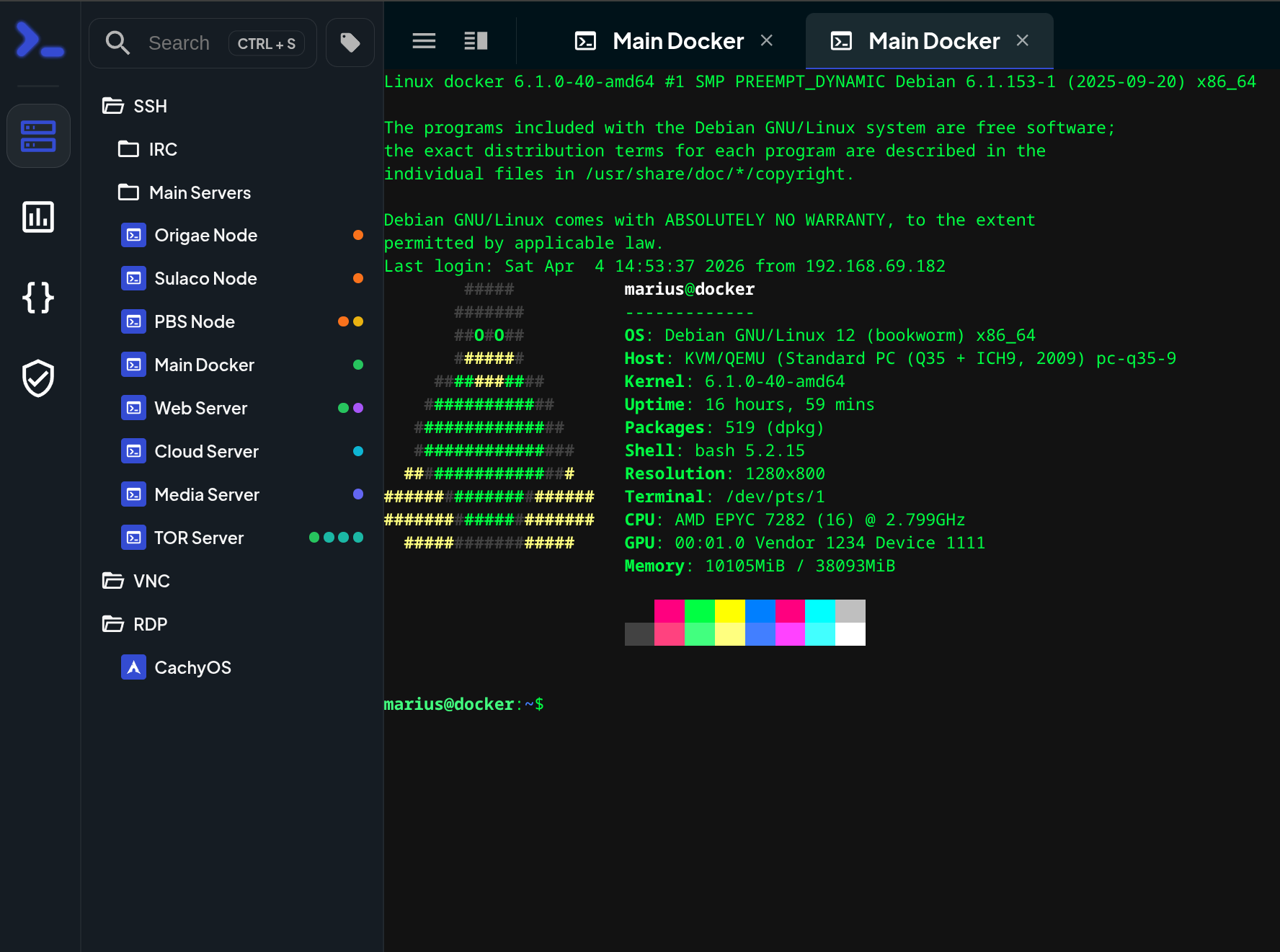
That has been especially useful for things like:
Quick server checks
Sometimes I do not need a full session. I just need to see if a machine is alive, check disk space, look at a service status, or confirm a container is behaving. Nexterm is perfect for that sort of thing. It removes the little bit of effort that normally comes before the actual check.
Managing Linux VMs and containers
A lot of what I run is Linux-based, so shell access is still the fastest way to do almost anything. I use Nexterm to hop into VMs, edit configs, run updates, inspect logs, and fix the small annoying problems that crop up in any lab.
It is especially nice when I am already working in a browser and do not want to break concentration by bouncing between devices and apps.
A jump box without feeling like a jump box
I like having a central place to start from. Nexterm has basically become that for me.
Instead of thinking, "Which machine am I on right now, and where is my SSH key, and do I have the right terminal setup here?" I can just go into Nexterm and start moving through the environment from there.
It feels a bit like having a dedicated admin console that is always there when I need it.
Remote access from lighter devices
This is where I noticed the benefit most.
If I am on a laptop, another PC, or just not on my main desktop, Nexterm saves time. I do not need my entire local terminal environment set up perfectly just to do one five-minute job. I open a browser, sign in, and carry on.
That has made it surprisingly useful for those moments where I only need to fix one thing, but that one thing would otherwise turn into a whole session.
Where it helps more than I expected
The biggest win has not been power. It has been convenience.
And in homelab terms, convenience matters. A tool that makes admin work easier tends to get used. A tool that adds steps tends to be forgotten, even if it is technically better.
Nexterm ended up living in that sweet spot where it is lightweight enough to use casually, but useful enough to become part of the normal routine.
I have also found that it encourages quicker maintenance. If it is easy to jump in and deal with a problem immediately, I am more likely to do it on the spot instead of mentally filing it away for later. That alone probably makes the lab run better.
What it does not replace
I should say this too: I do not see Nexterm as a replacement for proper terminal workflows.
When I am doing heavier work, proper troubleshooting, longer sessions, or anything that involves multiple panes, local tooling, scripts, or a lot of editing, I still go back to my normal terminal setup. That is not changing.
Nexterm is there for accessibility and speed, not for replacing everything else.
That is exactly why I like it.
It does one job really well: it makes my infrastructure easier to reach.
Aaaanyways....
Out of all the things I have deployed in my homelab, Nexterm is one of those tools that quietly proved its value after the install.
It did not completely change how I manage my environment. It just removed a lot of unnecessary friction. And honestly, that is sometimes the best kind of upgrade.
It is faster to get into systems.
It is easier to check things from wherever I am.
It gives me a clean central point of access.
And it fits neatly into the way I already manage the rest of the lab.
For something that looks fairly simple on the surface, it has ended up being genuinely useful.
That is usually the sign that a tool deserves to stay.
Hello !
Good evening. A 51 fantastic website 1 that I found on the Internet.
Check out this website. There's a great article there. <a href=https://themuttscouts.org/betting-guide/how-social-media-influences-betting-trends-and-odds/>https://cheyennechapel.com/online-betting/the-rise-of-voice-activated-betting-assistants/</a>|
There is sure to be a lot of useful and interesting information for you here.
You'll find everything you need and more. Feel free to follow the link below.
Comment was deleted by Admin due to abuse or spam.
<a href=https://t.me/Asiapsi>https://t.me/Asiapsi</a>
https://akbweaexfx.com - Anoyef <a href='https://ivjqqvdg.com'>Xoduxufol</a> https://royvlweoq.com
Comment was deleted by Admin due to abuse or spam.
Общее впечатление: надежный информационный ресурс для снабженцев.
https://redmetsplav.ru/store/cirkoniy-i-ego-splavy/cirkoniy-e110k-1/pokovka-cirkonievaya-e110k/
Just wish to say your article is as amazing. The clarity in your post is simply great and i could assume you are an expert on this subject. Fine with your permission let me to grab your feed to keep up to date with forthcoming post. Thanks a million and please continue the rewarding work.
Hello team!
I came across a 171 awesome resource that I think you should take a look at.
This resource is packed with a lot of useful information that you might find valuable.
It has everything you could possibly need, so be sure to give it a visit!
<a href=https://gadgetsng.com/computer-science/>https://gadgetsng.com/computer-science/</a>
Furthermore do not overlook, guys, which a person always can in the article find answers for your most complicated queries. We tried to lay out all data via the extremely accessible method.
Hello beautiful soul!
http://link.darkshopping.online/sitemap.xml